
Rhinoback2007 - Download
You'll be able to download in few seconds.
Publisher Description
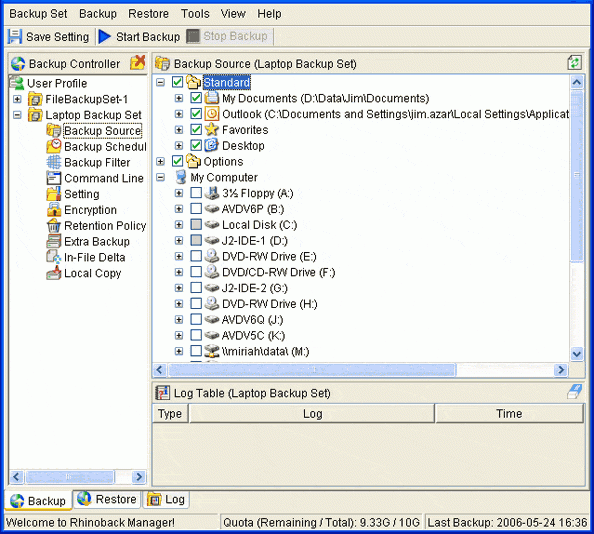
Professional secure online data backup for small business and home computer owners. Your data is automatically encrypted and transmitted to secure offsite data storage facilities Protect critical data from virtually any disaster. Free for home computer users. Flexible plans for businesses to choose storage and options that best fit your needs. Get the same disaster recovery protection as the large corporations for a fraction of the cost. This includes backing up MS SQL Server, MS Exchange, Oracle, MYSQL, Lotus Notes, Lotus Domino.
No upfront charges. No hardware or software to purchase. No contracts. It only takes 5 minutes to setup and your files will be backed up automatically everyday. Don't wait until you lose your data to take action.
Robust functionality including the ability backup open files. Incremental backup, and In-file delta backups are standard with every plan. Files can be restored through the client agent or through the web interface, 24 hours a day, 7 days a week, 365 days per year. Rhinoback provides functionality only found in the most expensive data backup solutions, but without the high cost.
Your data is encrypted before it leaves your computer and you are the only person with the encryption key. Your encryption key is never transmitted or stored at the offsite data storage facilities. No employees, technicians or any other person can access your data without your encryption key.
If a disaster occurs, you can restore your data from anywhere, anytime. Rhinoback stores 2 copies of your data in 2 completely separate secure data centers in two different locations. This provides more that double the protection. For more informaiton see www.rhinoback.com.
Rock-solid reliability, Satisfaction guaranteed or your money back!
About Rhinoback
This Backup & Restore program is available in English. It was last updated on 29 September, 2026. Rhinoback is compatible with the following operating systems: Linux, Mac, Other, Unix, Windows.
The company that develops Rhinoback is Rhino USA, LLc.. The latest version released by its developer is 2007.
The download we have available for Rhinoback has a file size of 18.9 MB. Just click the green Download button above to start the downloading process. The program is listed on our website since 2007-04-07 and was downloaded 0 times. We have already checked if the download link is safe, however for your own protection we recommend that you scan the downloaded software with your antivirus. Your antivirus may detect the Rhinoback as malware if the download link is broken.
How to install Rhinoback on your Windows device:
- Click on the Download button on our website. This will start the download from the website of the developer.
- Once the Rhinoback is downloaded click on it to start the setup process (assuming you are on a desktop computer).
- When the installation is finished you should be able to see and run the program.
Program Details
System requirements
Download information
Pricing
Version History
version 2007 R2
posted on 2007-04-07
1. Feature: Support added for Windows Vista. 2. Feature: A notification is displayed before a backup is started on a laptop computer. 3. Feature: Report emails now include backup set name. 4. Feature: New backup sets can be specified to run on only one computer.
Disclaimer
External Download
We do not host Rhinoback on our servers. We did not scan it for viruses, adware, spyware or other type of malware. This app is hosted by the software publisher and passed their terms and conditions to be listed there. We recommend caution when installing it.
The external download link for Rhinoback is provided to you by apps112.com without any warranties, representations or guarantees of any kind, so access it at your own risk.
If you have questions regarding this particular app contact the publisher directly. For questions about the functionalities of apps112.com contact us.
